

Python and RSI Trading Strategy (Backtest, Trading Rules, Code, Setup)

Python is the most popular programming language to backtest trading strategies. However, most people are afraid of it or don’t know where to start, while others think it’s difficult to learn.
Today we will show you how to backtest an RSI trading strategy with a few lines of code, step by step, for beginners. As you will see, you don’t need to have a computer science degree to do it! Also, if you want profitable investment strategies, you might want to check out that clickable link. We have hundreds of strategies with specific trading rules and backtests.
Key Takeaways
- Python enables easy trading strategy backtesting
- Yahoo Finance data accessed via yfinance library
- RSI indicator can be computed using pandas_ta
- RSI signals identify overbought and oversold conditions
- Buy when RSI(2) drops below ten
- Sell when RSI(2) rises above sixty
- Loop-based logic generates trading entry signals
- Cumulative returns visualize strategy performance over time
In this article, we will learn how to download historical stock data from Yahoo Finance, calculate the RSI indicator, generate trading signals, and plot the returns of the strategy, all using Python.

Download historical data using Python
yfinance allows us to download historical data from Yahoo Finance for free and also includes fundamental data such as income statements, trading multiples, and dividends, among many others.
We are going to create a Python notebook to run our code. A Python notebook is a web-based environment to create and edit Python scripts (for example, Jupyter notebook or Google Colaboratory). They are easier to use and understand than other Python programs to write and run our code.
In our Python notebook, we are going to first import the yfinance library as well as the pandas library, which will allow us to manipulate the data frame later. Then we define a variable, which we named data, and download the dataframe of the historical prices of the SPY using a yfinance function called yf.download().
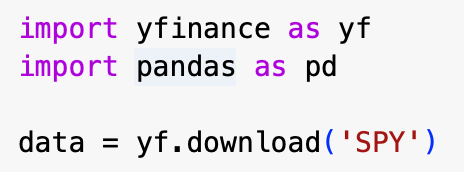
If we print the data, here is the output:
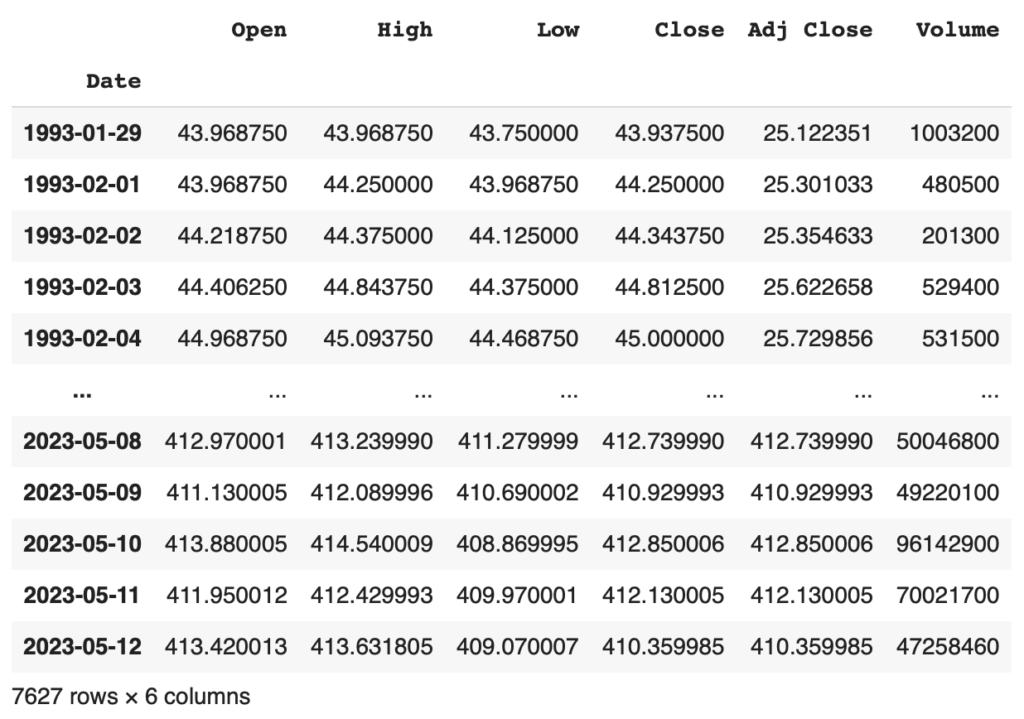
Now we have the daily open, high, low, close, adjusted close, and volume values for the SPY since 1993!
Calculating the RSI indicator
The formula to calculate the relative strength index is not difficult, but there is a library in Python that can do it for us. Pandas_ta is an easy-to-use library that leverages the Pandas package with hundreds of technical indicators – all for free.
As we did before with yfinance and pandas, we need to import pandas_ta into our notebook. The function to calculate the RSI is called pta.rsi(). Inside the parenthesis goes two inputs: the daily closing price of the SPY and the length of the RSI we want, in this case, two days.
So to our data frame named data, we are going to add a new column called ’rsi’ and use the formula mentioned above to calculate the RSI.

RSI trading rules
The trading rules of the strategy are pretty simple:
Trading Rules
You find the trading rules at the bottom of the article
Generating the RSI trading signals
In order to generate the trading signals, we are going to have to do a loop through the data frame using the for function and checking for conditions with the if function.
This strategy has two different signals, one for buying and the other for selling. This means that we are going to scan every row in the data frame one by one (for function), checking for two conditions in each signal (if function):
- For the buy signal, the RSI must be below ten and z equal to 1 (see z described below)
- For the sell signal, RSI must be above 60 and z be equal to 0
We created another column in the data frame called regime and put one if the buy signal is triggered and -1 when the sell signal is flashed.
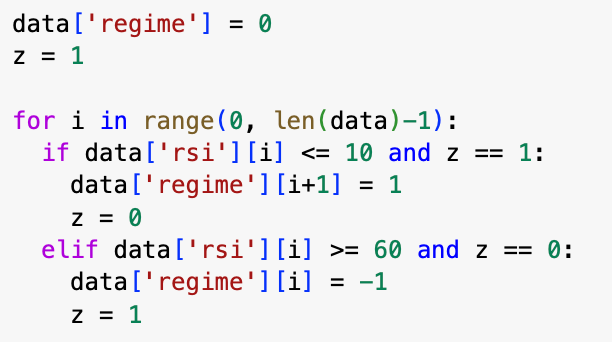
What is z? z is a variable we set equal to 1, so if, for example, there are two consecutive days where the RSI(2) is below 10, the signal is only generated on the first day because after that, z value changes to 0. The two conditions are no longer met. The same goes for the sell signal.
It is also important to note that we put 1 in the following row(i+1) where the buy signal is generated because if the signal is triggered at the close of the day, meaning that we didn’t gain or lose any money that day. If we weren’t to put i+1 we would consider the return of the SPY the day we bought it, even though we bought it at the close.
Now, to make it easier to calculate the returns, we are going to fill with 1’s the regime columns between where the buy signals are generated and when the sell signals are triggered (before this, the value in these rows was 0).
In other words, if the previous row equals 1, put a 1 in the current column. Eventually, we will reach a point where the previous column is -1, and the condition is no longer met.

Now here is an example of how the data frame would look when a buy and sell signal is triggered:

Calculating, backtesting, and plotting the returns of the strategy
Finally, to calculate the returns and performance of the strategy, we need to make one final loop through the data frame (we promise it is the last!).
Before that, we are going to create a new column called change, where we are going to calculate the daily change of the SPY. In order to do this, we will use the pct_change() function and sum 1 in the end.
Then we will create another column called returns where if the value of the regime does not equal zero, we put the daily change of the SPY, if not, we put just 1.

To plot the cumulative returns of the strategy, we will use the cumprod() function followed by the .plot() function to make a graph showing the compounded returns. Inside the parentheses, we add a label to differentiate the market returns from the strategy returns.
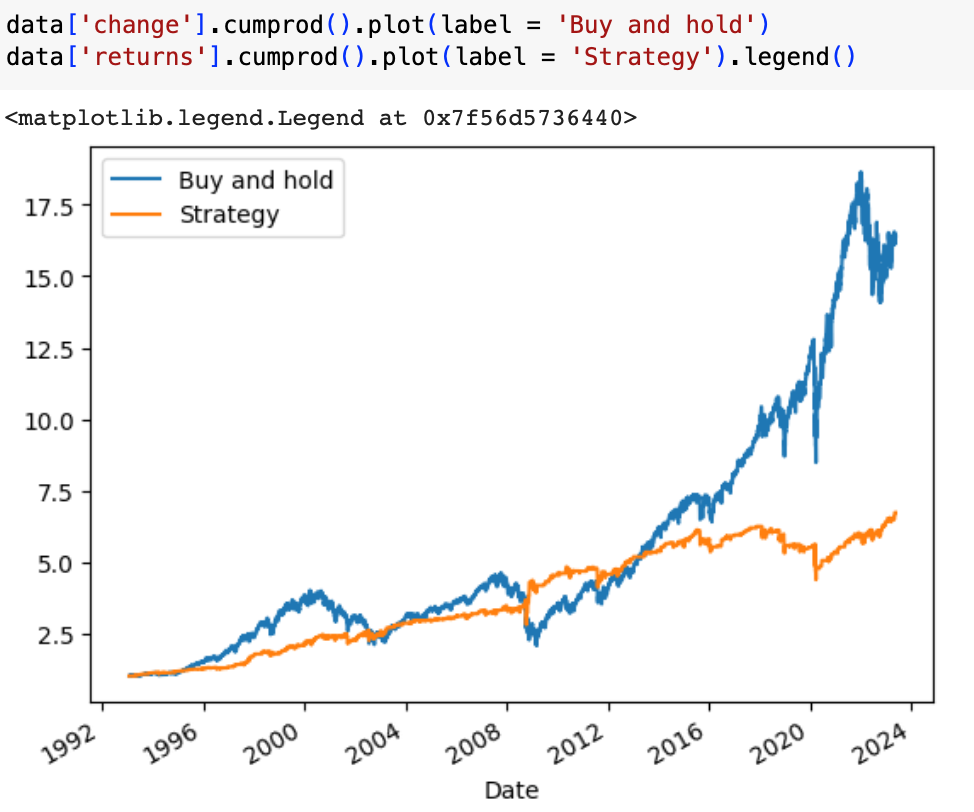
And that’s it! You just backtested a trading strategy using Python.
3 RSI trading strategies video
Related reading:
Python and Trend Following Trading Strategy
Get Started With Python Making Trading Strategies
Python and Momentum Trading Strategy
Creating and backtesting a RSI trading strategy using Python – conclusion
To sum up, today we backtested an RSI trading strategy from scratch. You learned some basic Python code and hopefully found out how easy it is to use Python to backtest trading strategies.
Python-related resources
We have written many articles about Python, and you might find these interesting:
- Python Backtesting Trading Strategies (Plenty of examples with code and images)
- Get Started With Python Making Trading Strategies (Step By Step)
- How To Download Data For Your Trading Strategy From Yahoo!Finance With Python
- Best Python Libraries For Algorithmic Trading – Examples
- How To Measure Skewness Of A Trading Strategy Using Python
- Python Bollinger Band Trading Strategy: Backtest, Rules, Code, Setup, Performance
- Python and Trend Following Trading Strategy
- Python and Momentum Trading Strategy
- How To Make An Average True Range (ATR) Trading Strategy In Python
- How To Build A Trading Strategy From FRED Data In Python
- Python and MACD Trading Strategy: Backtest, Rules, Code, Setup, Performance
- How To Measure Skewness Of A Trading Strategy Using Python
- How To Do A Monte Carlo Simulation Using Python